
Call Routing • 5 min read
How to Use Dynamic Forward in Twilanswer
Dynamic Forward sends each caller to the teammate assigned to their contact. Teammates with the Twilanswer app get the call in the app; others need a forwarding number.
Dynamic Forward sends each inbound call to the teammate assigned to that caller, instead of ringing one fixed phone for everyone. It is a tab on the Forward Call card when you configure a call route. Twilanswer looks up the caller in Contacts and forwards the call to the teammate assigned to that contact.
Beta: Dynamic Forward is in beta. The feature may evolve as we add capabilities and refine behavior. If something you need is missing or unclear, we welcome feedback.
Plan: Dynamic Forward is available on the Team and Custom plans. On the Solo plan, clicking the Dynamic Forward tab opens an upgrade prompt. If a route was already using Dynamic Forward and the plan is later downgraded, the card shows a locked notice, and you can switch that route back to Simple Forward.
How it works
When a call arrives on a route that uses Dynamic Forward:
- Twilanswer looks up the caller’s number in your contacts.
- If that contact is assigned to a user, Twilanswer rings that teammate in this order:
- If they have the Twilanswer app registered, the call rings in the app. Their cell phone does not ring.
- If they do not have the app, the call goes to their forwarding number.
- If the call cannot be resolved—the number is unknown, the contact has no assigned user, or the assignee has neither the app nor a forwarding number—the call follows Backup Forwarding Destination (Twilanswer voicemail, or a dedicated backup number such as a front office or founder line).
What you need before you start
Dynamic Forward needs three things in place:
- The Twilanswer app or a forwarding number for the people who should receive calls. A forwarding number is only needed for teammates without the app. See How to Add a Forwarding Number in Twilanswer.
- Each teammate set up with the Twilanswer app or a forwarding number.
- Contacts assigned to those users.
The Twilanswer app or a forwarding number
Teammates with the Twilanswer app registered receive Dynamic Forward calls in the app. They do not need a forwarding number for those calls.
For a teammate without the app, associate a forwarding number:
- Go to Settings > Users.
- The Forwarding Number column shows which device is linked to each user.

- Click Edit on a user.
- Under Forwarding Number, choose the device they should receive calls on.
- Click Save.

Assign contacts to teammates
On the Contacts page, set Assigned to when you add or edit a contact so inbound calls from that person can reach the right teammate. See How to Manage Contacts in Twilanswer.
Set up Dynamic Forward on a call route
- Open the route and choose Forward Call.
- Select the Dynamic Forward tab at the top of the card. The card says Send the call to another number or the contact's assigned user.
- Configure the settings below.
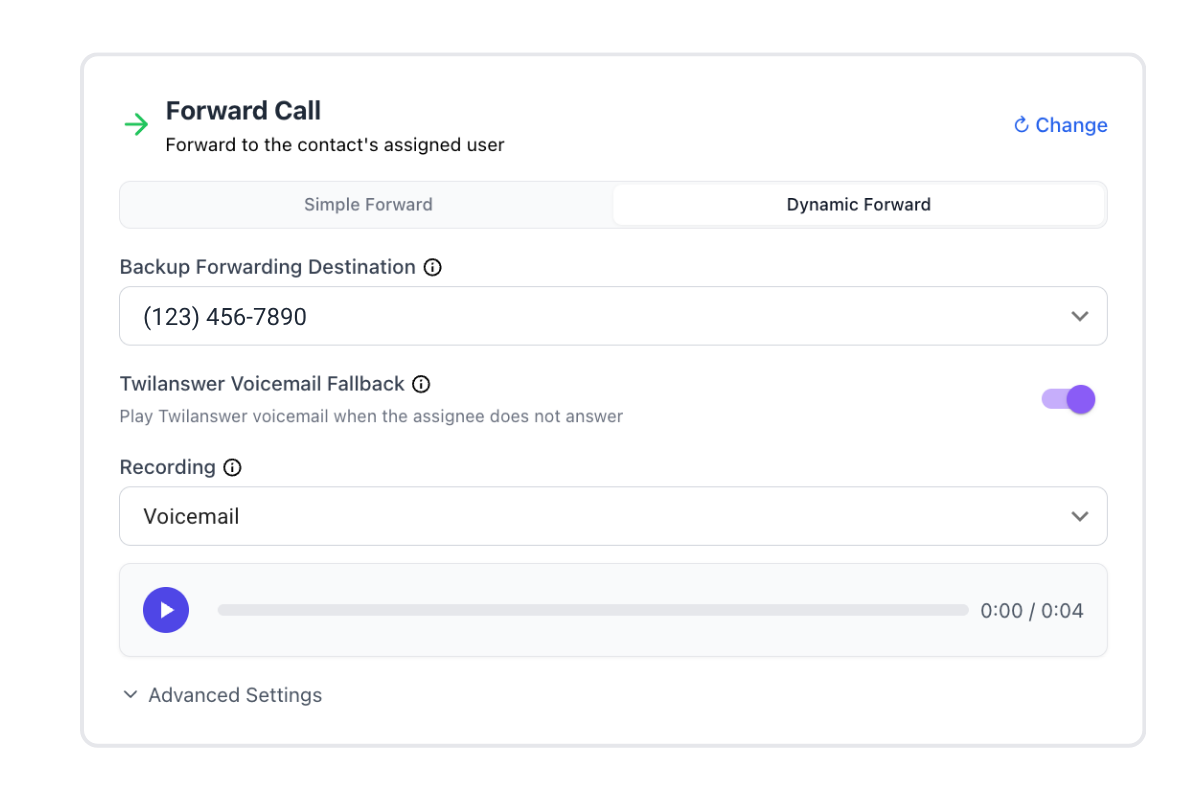
Backup Forwarding Destination
Backup Forwarding Destination is one dropdown. Use it when Twilanswer cannot send the call to an assigned teammate (unknown number, unassigned contact, or an assignee with neither the app nor a forwarding number):
- None — send to voicemail — Send those callers straight to Twilanswer voicemail. Choosing None always requires a Recording, even when Twilanswer Voicemail Fallback is off.
- A forwarding number — Forward them to a dedicated number, such as a front office or founder line.
Twilanswer Voicemail Fallback
Twilanswer Voicemail Fallback is a switch on this card. When the call is sent to a phone number, the switch decides what happens if that phone does not answer. It applies no matter which teammate’s forwarding number, or which backup number, received the call.
When it is on, if that phone does not answer, the call comes back to Twilanswer voicemail instead of the personal voicemail on that phone. You choose a Recording as the greeting. This is the same switch on Simple Forward.
When it is off, an unanswered forward to a phone follows that phone’s normal behavior—typically the carrier voicemail on that line.
Caller ID Setting
Open Advanced Settings for Caller ID Setting and Call Approval. Caller ID Setting uses the same options as Simple Forward:
- Original caller’s number — Useful when you want to see who is calling, especially if that number is already in your phone contacts.
- Show System Number — On a route, this shows your Twilio number. Useful when you want an obvious signal that the call is coming through your work line. Inside a call menu, the same option is labeled Show Twilio Line Number.
Call Approval
Call Approval works the same way as on Simple Forward: when it is enabled, answering a forwarded phone call does not connect you immediately—you must press a key (for example 1) to accept the call.
On a Dynamic Forward call to a phone, Twilanswer reads the contact’s name aloud so the person answering knows who is calling before they connect. Confirm Call Approval under Advanced Settings after you switch from Simple Forward. A blank setting is filled with Enabled; a value you already set is kept.
Why we generally recommend call approval is covered in How to Forward Calls in Twilanswer: it helps Twilanswer reclaim the call for Twilanswer voicemail if you decline, instead of the caller landing in personal voicemail.
Use How to Configure Call Routes for the full route workflow (hours, actions, notifications). For one fixed phone number instead of per-contact routing, use Simple Forward on the same card, covered in How to Forward Calls in Twilanswer.