
Add a call menu to your Twilio number
Set up an IVR on the Twilio number you already own — without writing TwiML, building Studio flows, or hosting anything yourself.
Free trial. No credit card required.
Call menus are available on Team and Custom plans.
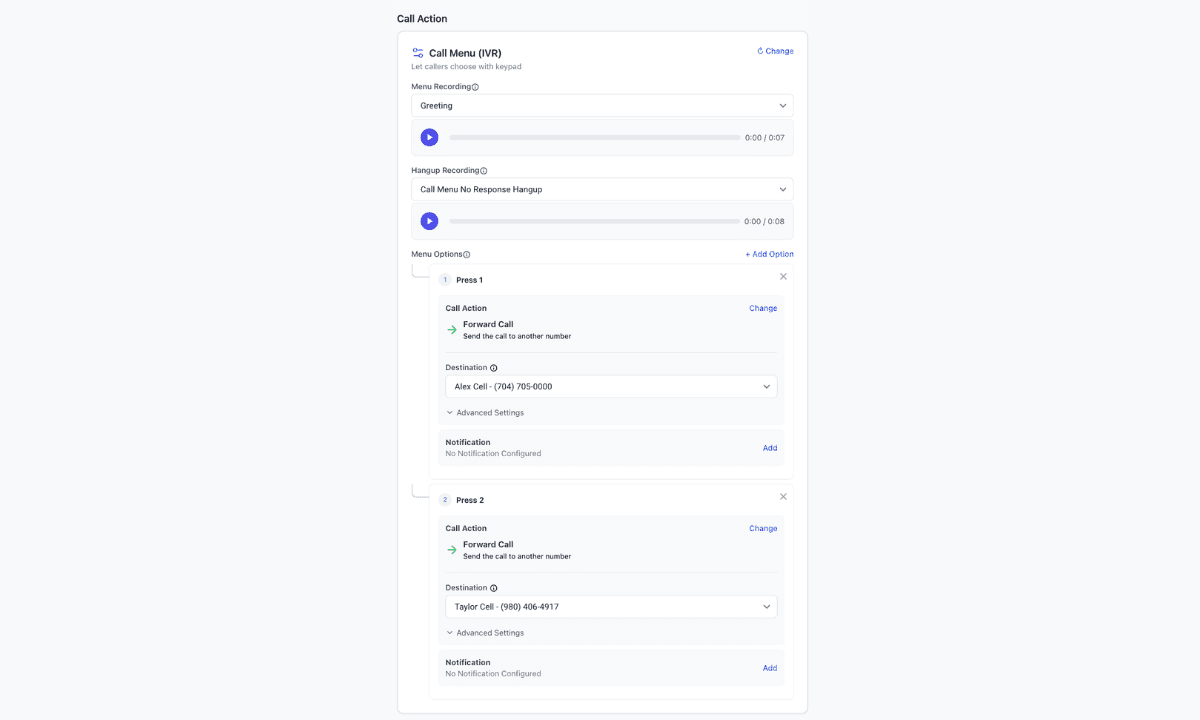
Everything you need for a Twilio call menu
Easy extension management
Add up to ten keypad options (press 1 for sales, press 2 for support) and change them anytime.
Custom rules per extension
Each option can forward, go to voicemail, or take another action, with its own notifications.
Time-based routing
Give each option its own hours, or use one schedule for the whole menu.
Update menu recordings anytime
Swap the menu prompt or timeout message from Recordings — no TwiML or Studio publish step.
How it works
- 01
Connect your Twilio account
Link the Twilio account you already use. You keep the number and the billing.
- 02
Select your existing number
Point that number at a Twilanswer route. No porting required.
- 03
Add a call menu as the action
Choose the menu recording, keypad options, and what each digit does.
- 04
You're live
Callers hear the menu and press a key. Each option follows the rules you set.
Can I build an IVR directly in Twilio?
Absolutely. Twilio provides `<Gather>`, Studio, and Functions to build a call menu yourself. You still have to host the flow, store recordings, and update the tree whenever the business changes.
Twilanswer gives you the finished interface on top of the Twilio number you already own, so you don't have to build and maintain that layer yourself.
Need more than a call menu?
Add a call menu to your Twilio number
Set up on the number you already own. Free trial, no credit card required.