
Add voicemail to your Twilio number
Set up voicemail on the Twilio number you already own — without writing TwiML, building Studio flows, or hosting anything yourself.
Free trial. No credit card required.
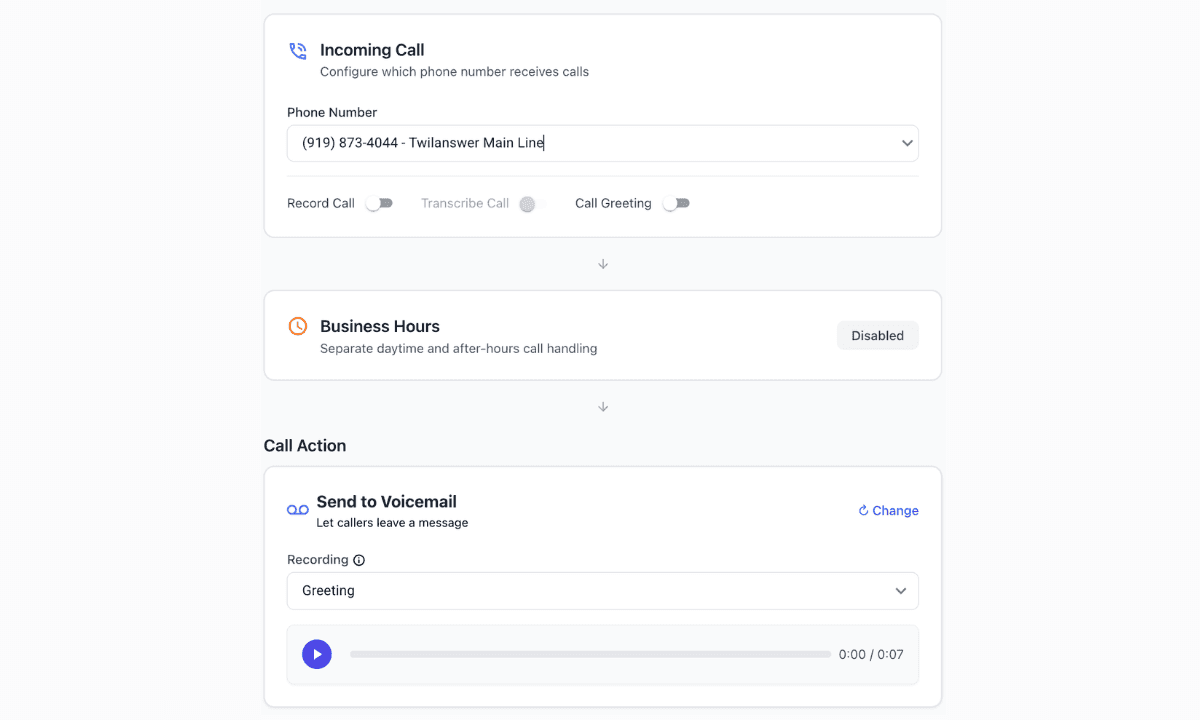
Everything you need for Twilio voicemail
Record or upload your greeting
Record a greeting in the dashboard or upload an audio file you already have. Callers hear it before they leave a message.
Transcribe messages
Voicemails are transcribed automatically, so you can read the message without playing the recording.
Notify your team
Get notified when a voicemail is processed, with the transcript and a link back to the call, through our many integrations including Slack and email.
Route different numbers differently
Each Twilio number can have its own greeting and voicemail behavior.
How it works
- 01
Connect your Twilio account
Link the Twilio account you already use. You keep the number and the billing.
- 02
Select your existing number
Point that number at a Twilanswer route. No porting required.
- 03
Choose voicemail as a destination
Send the call straight to voicemail, or fall back to voicemail if a forward isn't answered.
- 04
You're live
Callers hear your greeting and can leave a message. You get the recording and transcript.
Can I build voicemail directly in Twilio?
Absolutely. Twilio provides the primitives to build it yourself using TwiML, Studio, Functions, and webhooks. You can play a greeting, record the caller, store the audio, transcribe it, and notify your team — if you host and maintain that stack.
Twilanswer gives you the finished interface on top of the Twilio number you already own, so you don't have to build and maintain that layer yourself.
Need more than voicemail?
Add voicemail to your Twilio number
Set up on the number you already own. Free trial, no credit card required.