
Account Settings • 2 min read
How to Configure Recording and Transcription for Your Organization
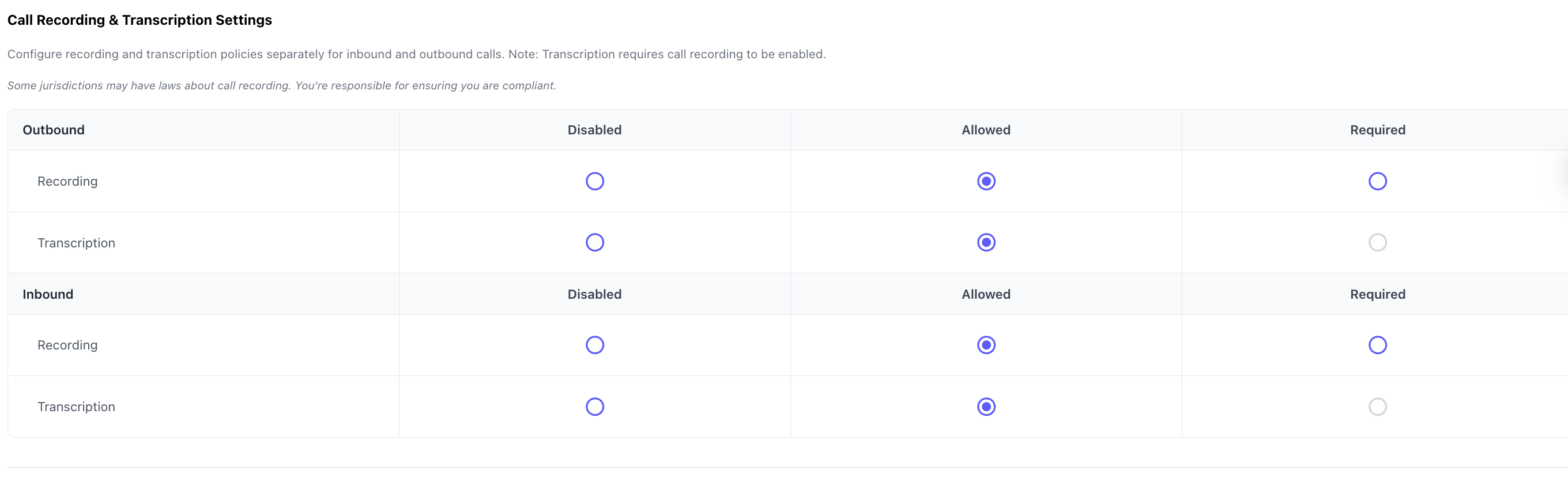
Set org-wide recording and transcription for inbound and outbound calls. Choose Disabled, Allowed, or Required; transcription always requires recording.
Your organization can define recording and transcription policies separately for inbound and outbound traffic. These settings cap what your users and call routes are allowed to do—finer control (per route or per dialer call) is available when policies are Allowed, as explained below.
Policy levels
For recording and for transcription, you can set each to one of three levels:
Disabled
- No one in the organization may record or transcribe calls under that policy (for that direction and type).
- Call routes and the dialer cannot turn recording or transcription on when the org policy is Disabled for that combination.
Allowed
- Users and routes may turn recording and/or transcription on or off where the product supports it:
- Outbound (dialer): choose per call whether to record/transcribe, within org limits.
- Inbound (call routes): configure per route whether to record/transcribe incoming calls, within org limits.
Required
- All relevant calls in that direction must be recorded or transcribed according to the policy—users and routes cannot opt out of that requirement.
Transcription requires recording: You cannot enable transcription without recording. Transcripts are generated from recorded audio, so if you want transcription, recording must be allowed or required at the organization level for that path.
Inbound vs outbound
Policies are configured separately for inbound and outbound calls. For example, you might require recording on inbound support lines while only allowing optional recording on outbound sales calls.
Where to change these settings
- Log in to Twilanswer.
- Open Settings from the sidebar.
- Open Call recording & transcription settings (the screen titled Call Recording & Transcription Settings, under Settings).
- Set Recording and Transcription for Outbound and Inbound to Disabled, Allowed, or Required as needed.
- Click Save (or Save changes) to apply.
Compliance, limits, and cost
- Some regions restrict call recording or require consent. You are responsible for compliance with applicable laws and policies.
- Transcription is subject to fair use limits that depend on your plan. For the latest caps that apply to your subscription, see Pricing.
- Recording and transcription may incur Twilio usage charges. See Twilio Voice pricing for current rates.