
Call Routing • 2 min read
How to Record and Transcribe Inbound Calls on a Call Route
Turn on recording and transcription for inbound calls on a specific route, within your org policy. Optional call greeting helps with consent before the rest of the route runs.
Inbound calls that hit a call route can be recorded and transcribed at the route level. You configure this near the start of the route editor—alongside the incoming phone number—so each line can follow its own preferences (within what your organization allows).
For a full walkthrough of building a route, see How to Configure Call Routes.
Route-level recording and transcription
When you create or edit a route, the section where you choose the incoming phone number also includes route-level settings for recording and transcription for inbound calls on that route.
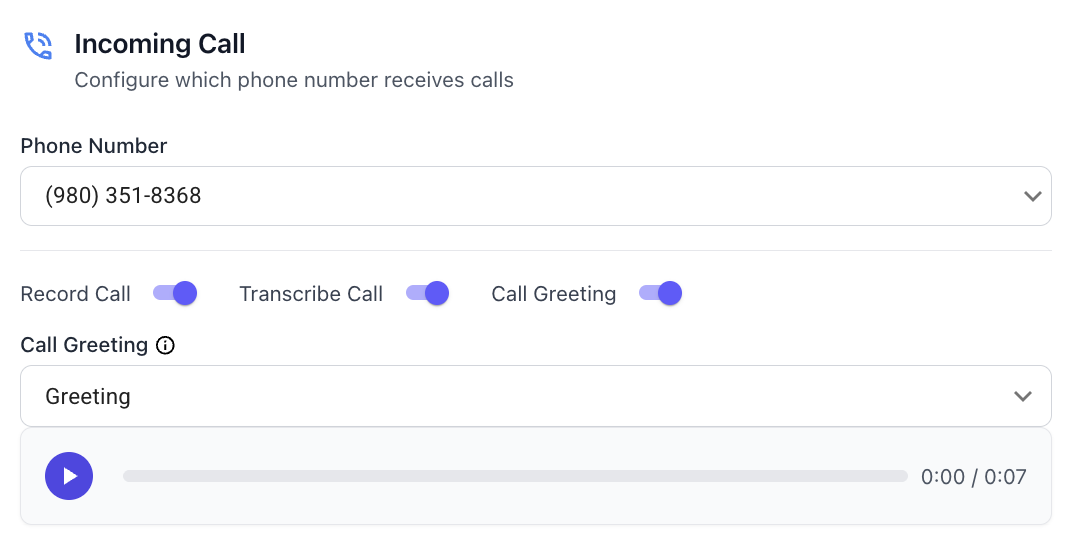
What you can set here depends on your organization’s recording and transcription policies. For example, if inbound recording is Disabled org-wide, route-level options cannot turn it on. If policies are Allowed or Required, you may have more flexibility or stricter requirements. Review How to Configure Recording and Transcription for Your Organization to see what applies to your account and whether you need to change anything there first.
Compliance: You are responsible for understanding and following the recording, transcription, and consent laws that apply to you, your callers, and your industry—including one-party vs. two-party consent, notice requirements, and any rules about storing or sharing audio and transcripts. Twilanswer provides controls to help you implement your policies; it does not provide legal advice.
Transcription requires recording. Transcripts are generated from recorded audio, so transcription cannot be enabled without recording. If you want inbound transcription on this route, recording must be turned on (and allowed by your organization) for that path.
Call greeting
The call greeting is separate from recording and transcription: you can turn it on or off regardless of those settings.
When call greeting is enabled, Twilanswer plays a recording from your Twilanswer library to the caller before the rest of the route runs—before business hours, call actions, and other logic.
That separation matters because many jurisdictions expect callers to be informed when a call may be recorded or transcribed. Pairing a clear greeting with route-level recording is a practical way to meet that expectation, but you should still confirm wording with your own legal or compliance review.
You can pick any recording you have already added in Twilanswer (for example from Recordings in the app). A concise, professional example you might adapt:
“Thank you for calling. This call may be recorded and transcribed for quality and training purposes. We’ll connect you with someone shortly.”
Adjust the script for your brand, your regions, and the rules that apply to you—some teams prefer explicit consent language; others use shorter notice-only wording where permitted.
To add or manage audio you can use as a greeting, see How to Create a Live Recording in Twilanswer and How to Upload a Recording in Twilanswer.