
How to Set Up Voicemail to Email in Twilio (The Easy Way)
July 29, 2026 · Twilanswer Team
A voicemail nobody sees is the same as no voicemail at all. If a caller leaves a message and it just sits in a dashboard your team forgets to check, you have lost the same lead you would have lost with no voicemail system at all.
Short answer: Twilio does not send voicemail notifications to email on its own. To get a voicemail-to-email setup on raw Twilio, you record the message with the <Record> verb, handle the recording callback on your own server, and send the email yourself through an email API like SendGrid or Twilio SendGrid. If you would rather skip the code, Twilanswer sends voicemail notifications to email straight from a call route, using your existing Twilio account.
Why Voicemail-to-Email Gets Complicated
Twilio's <Record> verb captures the audio and can trigger a transcription, but it has no concept of "email" at all. Twilio's job ends at giving you a recording URL, a caller number, and optionally a transcription, delivered to a webhook you control. Turning that into an actual email in someone's inbox is entirely on you.
That means picking an email provider, writing the email body, deciding who receives it, handling failures if the send doesn't go through, and keeping all of that working every time you change your call flow. None of it is hard in isolation, but it is another system to build and maintain on top of the voicemail recording itself.
The Hard Way: Voicemail to Email in Twilio
Want to skip ahead to the easy way?
Here is the standard path for getting a Twilio voicemail into an inbox:
- Set up voicemail recording on your Twilio number using TwiML with
<Record>, as described in a basic Twilio voicemail setup. - Point the
actioncallback at a webhook endpoint on your server. Twilio POSTs the recording URL, caller number, and duration here once the message is recorded. - Add an email API to your server, such as SendGrid, Mailgun, or another transactional email service, and store the API credentials securely.
- In your webhook handler, compose and send the email using the recording URL, caller number, and transcription (if you requested one) as the body.
- Handle delivery failures so a bounced or failed send doesn't mean a voicemail quietly disappears.
A webhook handler that sends a voicemail email might look like this:
const sgMail = require('@sendgrid/mail');
sgMail.setApiKey(process.env.SENDGRID_API_KEY);

app.post('/voicemail-complete', async (req, res) => {
  const recordingUrl = req.body.RecordingUrl;
  const caller = req.body.From;
  const duration = req.body.RecordingDuration;

  await sgMail.send({
    to: 'team@yourcompany.com',
    from: 'voicemail@yourcompany.com',
    subject: `New voicemail from ${caller}`,
    text: `You have a new voicemail (${duration}s) from ${caller}.\n\nListen here: ${recordingUrl}`
  });

  res.type('text/xml');
  res.send('<Response><Hangup/></Response>');
});
That's enough to get a bare email out the door. It is not enough to run this reliably for a business.
What You Still Have to Build
Sending one email from one webhook is the easy part. Running this in production means also handling:
- Retry logic for failed or bounced email sends
- Multiple recipients, or different recipients for different numbers or routes
- Including the transcription text in the email, not just a raw recording link
- Making sure the recording link doesn't expire or require Twilio auth to open
- Keeping the email templates readable and on-brand
- Updating who gets notified without redeploying code
- Testing the whole path every time your call flow changes
None of this is exotic engineering, but it adds up to a small email pipeline sitting on top of your voicemail system, maintained indefinitely.
Common Voicemail-to-Email Mistakes
- Sending the raw recording URL without checking it's actually accessible outside Twilio's authenticated API
- No fallback recipient if the primary inbox is unmonitored
- Treating the email send as fire-and-forget with no error handling
- Forgetting to include caller number or transcription, leaving the team to guess who called
- Building this once and never revisiting it as routing or staffing changes
The Easy Way: Voicemail to Email with Twilanswer
Twilanswer runs on your own Twilio account, so you are not replacing Twilio here, you are removing the webhook and email-sending code that normally sits between a Twilio recording and an inbox.
- Set up a voicemail action on a call route, including the greeting callers hear before they leave a message.
- Add an email notification channel: give it a nickname, enter the address, and verify it with the code Twilanswer emails you.
- Confirm the channel shows as Active on your Channels list.
- Attach that email channel to the notifications for the voicemail route.
- Test the number end to end.
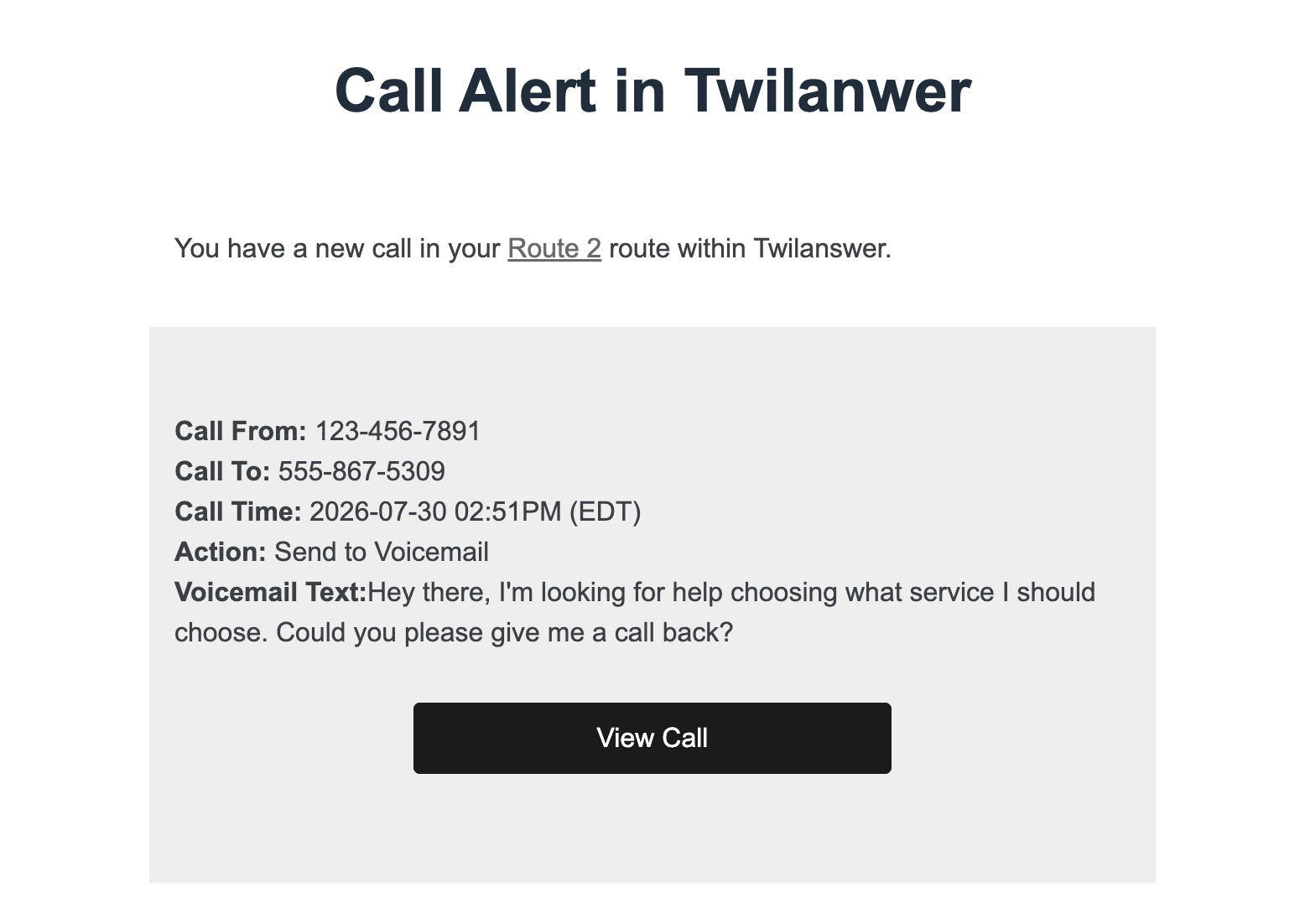
Voicemails in Twilanswer are recorded and transcribed automatically, so there is no separate recording or transcription setting to turn on for this to work. That toggle only applies to live calls, not voicemail. The notification email includes the transcript directly in the body, plus a link back into Twilanswer where you can play the recording and see the same call details. From there, every voicemail on that route notifies the email address you configured, with no server, webhook, or email API key involved on your side.
Example: A Practical Voicemail-to-Email Flow
A small business runs support over email and chat, and does not offer live phone support at all. Customers can still reach a number, though:
- The number is set up to send straight to voicemail, with no attempt to ring anyone first
- Callers hear a greeting explaining that leaving a message is the way to reach the team, and that someone will follow up
- The voicemail is recorded and transcribed automatically
- An email notification goes to the shared support inbox the moment the voicemail is processed, with the transcript right in the email and a link to log in and play the recording
Nobody on the team has to check a separate dashboard just to know a voicemail came in. It shows up in the inbox they already check, transcript included, with one link to log in and hear the recording if they need to.
Twilio vs. Twilanswer for Voicemail to Email
| Feature | Raw Twilio | Twilanswer |
|---|---|---|
| Setup time | Hours (webhook + email API) | Minutes in a dashboard |
| Code & servers | Webhook endpoint, email API integration | No code or server management |
| Who can update it | Engineers | Anyone on your team |
| Email delivery handling | You build retries, formatting, recipients | Built into the email channel |
| Best for | Teams with an existing email pipeline | Teams that want voicemail-to-email live quickly |
Choose raw Twilio if:
- You already have an email sending pipeline you want to route this through
- You need voicemail notifications tied into a custom internal system
- You have engineers available to maintain the webhook long term
Choose Twilanswer if:
- You want voicemail-to-email working without writing a webhook
- You want non-technical teammates to add or change notification recipients
- You want the transcription included without building a separate handler
- You'd rather keep engineering time off of internal notification plumbing
Frequently Asked Questions
Does Twilio send voicemail notifications to email by default?
No. Twilio's <Record> verb captures and stores the audio, and can optionally transcribe it, but Twilio has no built-in concept of emailing that voicemail to anyone. You have to write a webhook handler that receives the recording details and sends the email yourself, or use a no-code layer like Twilanswer that includes email notifications as part of the voicemail setup.
How do I get a Twilio voicemail recording emailed to my team?
Point the <Record> verb's action callback at a server endpoint, then use an email API like SendGrid inside that endpoint to send a message with the recording URL and caller details. Twilanswer handles this without a webhook: you add a verified email channel and attach it to a voicemail route's notifications.
Do I need a server to send Twilio voicemail notifications to email?
Yes, for the standard Twilio approach. You need a publicly reachable webhook to receive the recording callback, plus an email API and credentials to actually send the notification. Twilanswer removes both requirements by handling the voicemail recording and the email send inside the platform.
Can the voicemail email include the transcription, not just the recording link?
Yes, either way, but you have to build it yourself on raw Twilio. Request a transcription with transcribe="true" on the <Record> verb, then include the transcribed text in the email body you compose in your transcribeCallback handler. With Twilanswer, voicemails are recorded and transcribed automatically, and the notification email includes the transcript directly in the body, along with a link back into Twilanswer to play the recording, with no separate setting to turn on and no extra code.
Final Thoughts
Recording a voicemail on Twilio is the easy part. Getting that voicemail into someone's inbox reliably is where most teams end up writing and maintaining a small email pipeline they didn't plan on owning.
If you have an existing email sending setup and engineers who can maintain a webhook, building it yourself gives you full control over the format and delivery logic. If you would rather have voicemail notifications land in an inbox without writing that pipeline, try Twilanswer free for 14 days and add an email channel to your existing Twilio number.